Bambu Lab A1 vs A1 Combo vs A1 Mini vs A1 Mini Combo: A Complete Comparison Guide
The Bambu Lab A1 series has become a popular choice in desktop 3D printing thanks to its high-speed printing, intelligent calibration, user-friendly operation, and multi-color printing capabilities.
However, buyers often struggle to understand the differences between the four configurations:
- Bambu Lab A1 Printer
- Bambu Lab A1 Combo Printer
- Bambu Lab A1 Mini Printer
- Bambu Lab A1 Mini Combo Printer
Although these models share many advanced features, they differ in build volume, machine structure, filament management, and application scenarios.
This guide explains their key differences to help individual users, businesses, distributors, and wholesalers select the right 3D printer.
1. Overview of the Bambu Lab A1 Series

Bambu Lab A1 Printer
The standard A1 is a full-size desktop FDM 3D printer suitable for prototyping, functional parts, daily printing tasks, and small-batch production. It offers a generous 256 × 256 × 256 mm build volume.
Bambu Lab A1 Combo Printer
The A1 Combo combines the standard A1 printer with the AMS Lite automatic filament management system, enabling automatic filament switching and four-color printing with the included system.


Bambu Lab A1 Mini Printer
The A1 Mini is a compact desktop 3D printer designed for beginners, hobbyists, educational institutions, and users with limited workspace. Its build volume is 180 × 180 × 180 mm.
Bambu Lab A1 Mini Combo Printer
The A1 Mini Combo combines the compact A1 Mini with AMS Lite, providing an affordable and space-conscious solution for creative multi-color 3D printing.

2. Bambu Lab A1 Series Specifications Comparison
| Specifications | A1 | A1 Combo | A1 Mini | A1 Mini Combo |
| Printing Technology | FDM | FDM | FDM | FDM |
| Build Volume (mm) | 256 × 256 × 256 | 256 × 256 × 256 | 180 × 180 × 180 | 180 × 180 × 180 |
| Max. Toolhead Speed | 500 mm/s | 500 mm/s | 500 mm/s | 500 mm/s |
| Max. Acceleration | 10,000 mm/s² | 10,000 mm/s² | 10,000 mm/s² | 10,000 mm/s² |
| Max. Nozzle Temperature | 300°C | 300°C | 300°C | 300°C |
| Max. Heatbed Temperature | 100°C | 100°C | 80°C | 80°C |
| Standard Nozzle | 0.4 mm | 0.4 mm | 0.4 mm | 0.4 mm |
| Filament Diameter | 1.75 mm | 1.75 mm | 1.75 mm | 1.75 mm |
| AMS Lite Included | No | Yes | No | Yes |
| Automatic Color Switching Out of the Box | No | Yes | No | Yes |
| Automatic Bed Leveling | Yes | Yes | Yes | Yes |
| Printer Net Weight | 8.3 kg | 8.3 kg* | 5.5 kg | 5.5 kg* |
| Machine Structure | Dual-Sided Gantry | Dual-Sided Gantry | Cantilever | Cantilever |
| Relative Price | Medium | Higher | Lower | Medium |
Printer weight excludes AMS Lite. Maximum speed represents the rated toolhead speed rather than the actual speed of every printing task.
3. Bambu Lab A1 vs A1 Mini: What Is the Difference?
Build Volume
The most significant difference between the A1 and A1 Mini is their printing capacity.
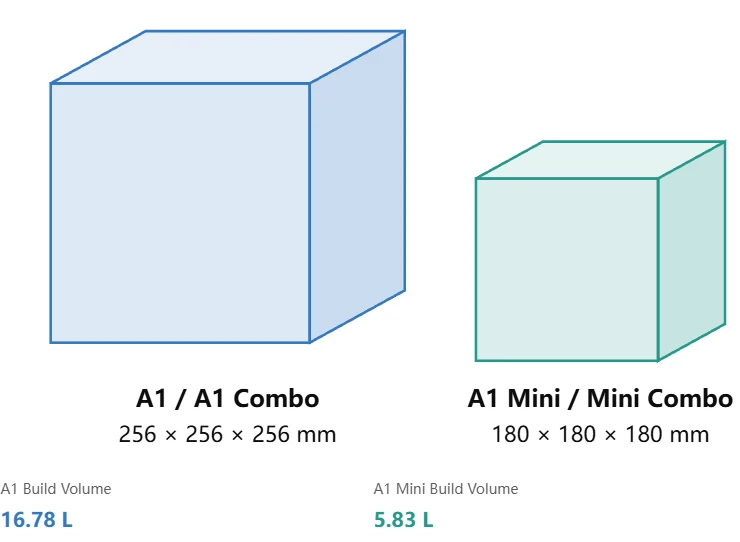
The A1 is better suited for larger models, functional components, engineering prototypes, and printing multiple objects in a single batch.
The A1 Mini is more suitable for small models, figurines, toys, keychains, educational projects, and personal DIY applications.
Machine Structure
The A1 features a larger frame with a dual-sided gantry structure, while the A1 Mini adopts a compact cantilever design.
The A1 Mini requires less installation space, making it particularly suitable for home offices, classrooms, and small workshops.
Heatbed Temperature
The A1 supports a maximum heatbed temperature of 100°C, compared with 80°C on the A1 Mini.
The higher heatbed temperature provides additional flexibility for materials and applications requiring stronger bed adhesion. However, both models feature an open-frame design and are primarily recommended for materials such as PLA, PETG, and TPU rather than engineering materials requiring a controlled heated chamber.
4. Standard Version vs Combo Version: What Does AMS Lite Do?
The main difference between the standard and Combo versions is the inclusion of AMS Lite (Automatic Material System Lite).
The Combo package does not upgrade the printer's build volume, maximum speed, or nozzle temperature. Instead, it expands filament management and multi-color printing capabilities.
| Function | Standard Version | Combo Version |
| Single-Color Printing | Yes | Yes |
| Automatic Four-Color Printing | Requires AMS Lite | Included |
| Automatic Filament Switching | Requires AMS Lite | Included |
| Automatic Backup Spool Switching | Requires AMS Lite | Included |
| Manual Filament Replacement | Supported | Supported |
| AMS Lite Upgrade | Optional | Already Included |
AMS Lite is particularly useful for producing colorful decorative models, branded products, customized gifts, educational models, and personalized consumer goods.
However, frequent color changes may increase printing time and filament consumption due to purging.
5. What Features Do All Four Models Share?
Despite their differences, all four Bambu Lab A1 configurations offer a similar core printing experience.
- High-Speed 3D Printing: Maximum toolhead speed of 500 mm/s and acceleration of 10,000 mm/s².
- Intelligent Automatic Calibration: Reduces manual adjustments and simplifies printer setup.
- Active Flow Rate Compensation: Helps maintain consistent filament extrusion.
- Automatic Bed Leveling: Improves first-layer consistency and simplifies operation.
- Quick-Swap Nozzle Design: Makes nozzle replacement and maintenance more convenient.
- Active Motor Noise Cancellation: Helps reduce operating noise.
- Remote Printing and Monitoring: Supports Bambu Studio and Bambu Handy.
- Filament Runout Detection: Helps prevent printing failures caused by running out of filament.
These features make the A1 series suitable for both entry-level users and experienced 3D printing enthusiasts.
6. Which Bambu Lab A1 3D Printer Should You Choose?
A1 Printer - Best for Practical Printing
Ideal for functional parts, product prototyping, larger models, workshops, and small-batch production.
01
A1 Combo - Best for Versatility
Ideal for creative studios, customized product businesses, multi-color models, and commercial printing applications.
02
A1 Mini - Best for Beginners
Ideal for users with limited budgets, students, hobbyists, and small desktop printing projects.
03
A1 Mini Combo - Best for Compact Multi-Color Printing
Ideal for figurines, creative gifts, educational projects, and personalized products.
04
Buy Bambu Lab A1 Series 3D Printers from Codewel

Whether you are looking for an entry-level desktop 3D printer, a high-speed prototyping solution, or a versatile multi-color printing system, the Bambu Lab A1 series offers multiple options to meet different printing requirements.
Codewel now offers all four Bambu Lab A1 series configurations:
- Bambu Lab A1 Printer
- Bambu Lab A1 Combo Printer
- Bambu Lab A1 Mini Printer
- Bambu Lab A1 Mini Combo Printer
We welcome inquiries from 3D printing distributors, wholesalers, retailers, educational institutions, creative studios, and professional users worldwide.
Codewel also supplies a range of 3D printing filaments and related accessories to support your different printing needs.
Looking for competitive prices, bulk purchasing options, or reliable 3D printer supply?
Contact Codewel today to discuss product availability, wholesale pricing, and suitable 3D printing solutions for your business.
Website: www.codewel.com
Email: mike@codewel.com
Codewel - Make Printing Easier.